Screen Mirroring TV & Miracast
TV Cast
4.6
AD
Détails de la Version
AD
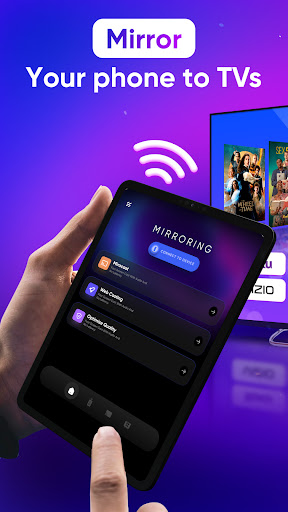
Screen Mirroring TV & Miracast is a screen mirror app as well as a smart remote control for all your Smart TVs, including screen mirroring for Samsung TV, screen share LG TV, screen mirroring Roku TV, Firestick TV, Chromecast, and many other smart TV brands. With our app, you can directly stream any media or files from the web or locally to your big screen within seconds now!!!
This app support screen sharing & screen casting in high quality without delay (zero delays) with a simple setup and no additional hardware required need.
Features of “Screen Mirroring TV & Miracast” app:
- Connect & screen share your phone to your Roku TV in two simple and quick steps.
- Screen mirroring phone screen to Chromecast tv in real-time with the highest video quality
- Control everything conveniently: volume, pause, fast forward, and rewind video with no delay.
- Cast to Samsung tv with photos, and videos on the big tv screen.
- Enjoy music, and play games on your LG smart TV.
- Access Youtube, IPTV easily.
- Use Remote control for smart TVs.
- Get to know your files fast.
Usage:
- For cast to tv to work properly, make sure your phone and device are connected to the same Wi-Fi
- Enable Miracast on your TV and Enable Wireless Display
- Select your existing device
- Enjoy everything, mirror any image, video, or audio you want to the big screen
All your devices are supported:
• Chromecast
• Roku, Roku Stick, and Roku TVs
• Most smart TVs: Hisense, Samsung TV, LG Smart TV, Sony TV, Panasonic, TLC, Toshiba, etc.
• Xbox, FireTV, and Fire Stick
• Other DLNA receivers
How to start screen mirroring:
- Connect your Android and your Roku TV to the same wifi network
- Open the app and connect the app to your Roku TV
- Tap on Screen Mirror and follow the instructions to start smart mirroring
- To stop mirroring click on the top red bar of your phone.
Disclaimer: This app is not affiliated with Roku, TCL, Samsung, LG, Vizio…or any other trademark mentioned here.
Évaluation Moyenne
261.16K+
Répartition des Évaluations
Avis Sélectionnés
Par Kira Reich
2025-09-06
Version
serviceintegration_with_other_servicesfun fact, most Android phones will allow you to cast your screen and audio without a third party app like this one. simply type the word "cast" into the search bar for your settings on your phone. if you have a Chromecast or something similar, it should show up as an option to cast to. Make sure your phone and TV are on the same Wi-Fi. Happy casting!
Par Cory Chandler
2025-02-02
Version
advertisementsmonetizationDOES NOT WORK! You have to pay for this app to work. If you do the free trial, then it's 10.00 more per year to purchase the app. Or 20.00 for a lifetime purchase before you know if it works or not. It also seems like it's not user-friendly. There are too many ads. Every time I pushed a button, a full screen add would pop up. App asked for a rating before I was even able to check it out. It never worked. It would only tell me how to set up a channel on my Roku TV. DUH!!
Par Amanda Roberts
2025-04-28
Version 2.0.23
advertisementsperformance_and_bugsupdates_and_maintenanceTOO. MANY. ADS. Every time you select an option -ad-, goes to the next page -ad-. The app just updated yesterday and now it's simply stopped connecting to my TV (Vizio). I just get a black screen. Not user friendly. And it's not the TV, others in my home can use different apps on their phones to connect to the TV. Look elsewhere for something far less irritating to use.
Captures d'Écran




AD
AD